Prerequisites
Before setting up the Google Admin Console integration, ensure the following requirements are met.
Google Admin Console (GAC) Integration Prerequisites
Required Prerequisites
- Accept Google Workspace Terms of Service
- Accept Google Cloud Platform (GCP) Terms of Service
- Dream™ Super Admin role assigned to your account
- Google Admin Console (GAC) Super Admin role assigned to your account
Accept Google Cloud Platform (GCP) Terms of Service
Log in to https://console.cloud.google.com. Terms of service will appear on initial login. If you do not see them, they have already been accepted.
Log in to https://admin.google.com to accept Google Workspace Terms of Service. If you do not see them on login, they have already been accepted.
Verify Dream™ Super Admin Access
-
Click your User Menu in the top-right corner
-
Click Settings
-
Confirm your role is listed as Super Admin
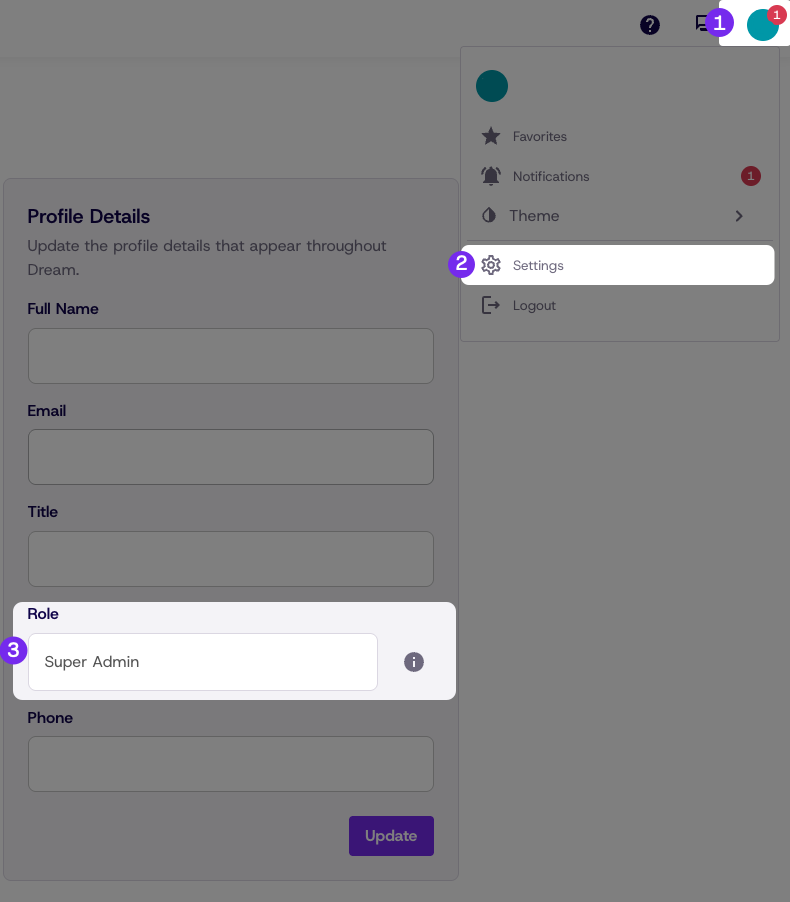 Role "Guest"
It is possible at this step that you will only have guest access to Dream™. This is not a problem and completing sync of your GAC will elevate you to Super Admin in Dream. If you see any other role, please reach out to [email protected] for account support.
Verify GAC Super Admin Access
-
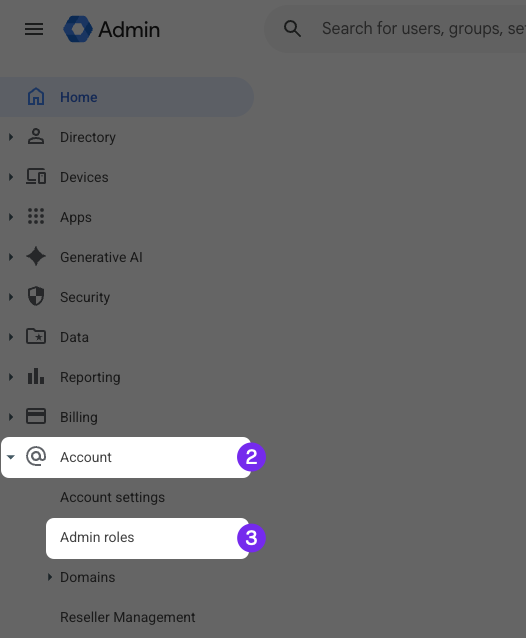
Log in to https://admin.google.com
-
Click Account, then click Admin Roles
-
Hover over Super Admin and click View Admins
-
Confirm your account appears in the Super Admin list
Updated about 1 month ago