
How to Add an Internal/Student Repair
Use this process when repairs are being handled by your internal teams
Create the Helpdesk Ticket
-
From anywhere in Dream™ click Create Ticket at the top of the page

-
Populate all relevant Helpdesk ticket information
-
Add a Serial Number or Asset Tag to the associated asset field as this is required for repair
-
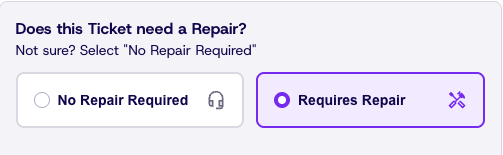
Click Requires Repair. This will populate more fields to fill out
-
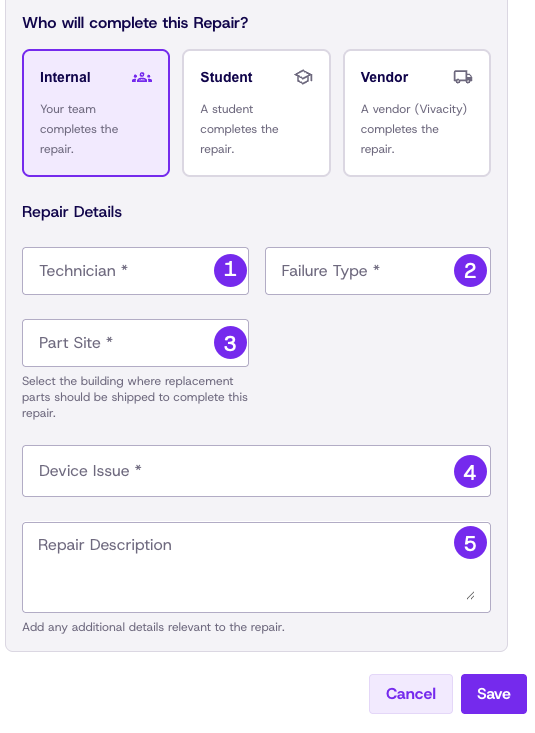
Select Internal or Student from the Repair Provider dropdown
Complete the Repair Ticket
If the Helpdesk ticket already exists, some information may be pre-populated
-
Technician: Who will be working on this ticket?
-
Failure Type:
- Accidental: Something is physically broken
- Intentional: Something was broken intentionally
- Mechanical: Something is not working as it should, but there is no visible damage
-
Part Site: If parts are needed, where should they be shipped?
-
Device Issue: What part is at fault (If unknown, other is fine)
-
Repair Description: What is the reported or diagnosed issue?
-
Click Save
Updated 22 days ago