Jump to Content
Dream
DocumentationAPI ReferenceRelease NotesDiscussions
v1.0

Log InDream
Documentation
Log In
v1.0DocumentationAPI ReferenceRelease NotesDiscussions
All
Pages
Start typing to search…

Getting Started

  • Welcome to Dream™
  • Getting Started

Integrations

  • Prerequisites
  • Integration Setup
  • Troubleshooting
    • Verify GAC Telemetry Policies
    • Confirm GCP is Enabled
  • Dream Open API — Coming Soon

Account Settup

  • How to Add Users
  • How to Add Buildings/Sites
  • Verify and Bulk Add Fleet Devices
  • Notifications
  • Custom Roles

Tickets & Repairs

  • How to Create a Helpdesk Ticket
  • Helpdesk Ticket General Information
  • How to Create a Ticket for Vivacity Repair
  • How to Create an Internal/Student Repair Ticket
  • How to Add a Part During Internal Repair Ticket Creation
  • How to Add a Line Item After a Ticket Has Been Created
  • Parts Only Dispatch
  • General Repair Ticket Information and Editing

Assets & Inventory

  • Loaner Management
    • Loaner Management — Check Out
    • Loaner Management — Check In
  • Bulk Updates
  • Parts Closet
  • Vendor Managed Inventory (VMI)

Reports

  • Google Device Telemetry — Fleet-Wide
  • Google Device Telemetry — Individual Device
  • Searching, Filtering, and Table Customization

Orders

  • Order Invoices
  • Order Quotes
Powered by 
  1. Orders

Order Quotes

Quotes generated by Vivacity are accessible directly in Dream™.


Steps

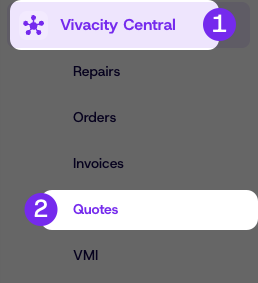
  1. Click Customer Central, then click Quotes
  2. Locate the desired quote in the table
  3. Click View to open, download, or print the quote as a PDF

Updated 2 days ago


Order Invoices