
Manage Site Closures in Dream™
Remove the stress of managing deliveries around site closures by adding calandar entries in Dream™
When a planned site closure occurs, regular or scheduled deliveries may need to be delayed or expedited to work around your schedule. With Dream™, these closures can be added to a calendar that is synced to our shipping teams to ensure that you never miss a delivery.
Navigation Steps
-
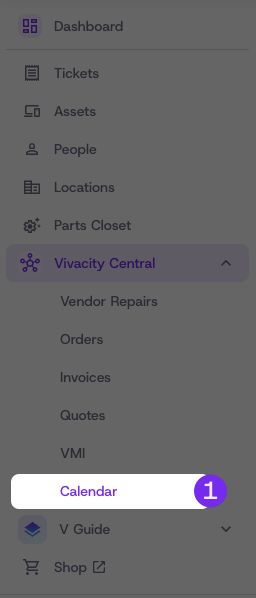
Under Vivacity Central in the left menu select Calendar
Adding a building closure
A closure can be added per building or apply to all buildings and will pause deliveries to a site for the duration of the closure.
Steps
-
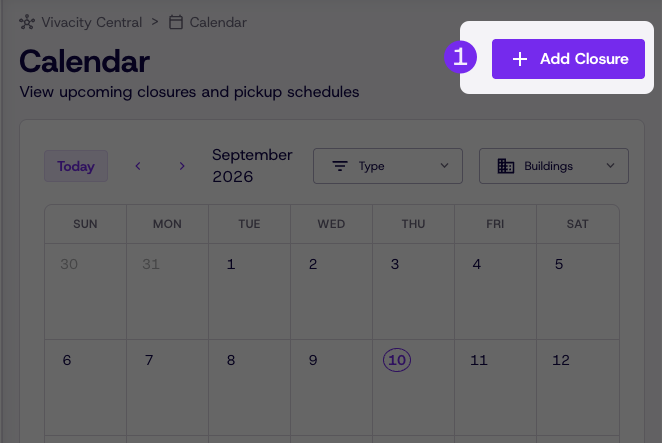
From the Calendar page, click Add Closure
-
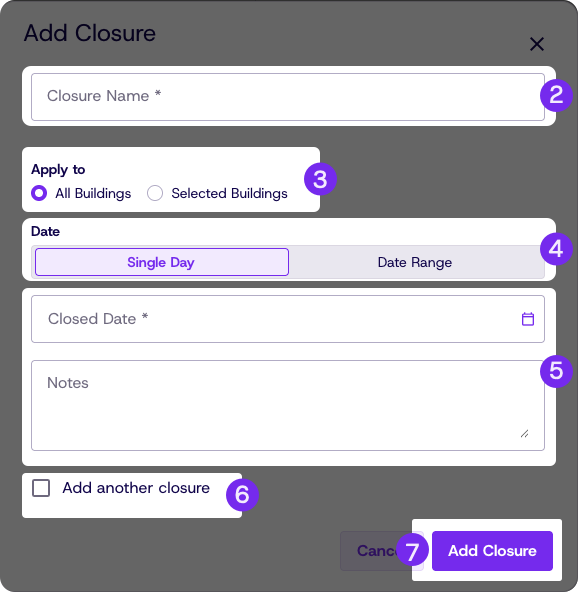
Add a name to the Closure e.g. "Closing for the Holiday"
-
Check whether this closer applies to a single building or all buildings
-
Select Single Day or Date Range for multi day closures
-
Add a date and any notes relevant to the closure
-
Optionally add an additional closure by checking the box
-
Click Add Closure
Updated 8 days ago