Manage your Admin Console from within Dream™
Update Google Admin Console fields like OU, Asset ID, and Location, even Disable and Deprovision devices without ever leaving Dream™
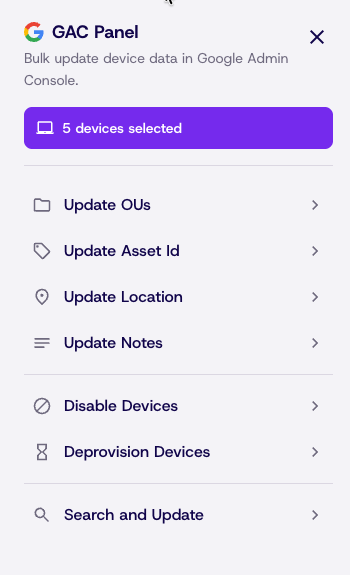
We are excited to bring you more ways to manage your Google Admin Console directly from Dream™. In service of making it as easy as possible to manage your entire fleet from a single account we are releasing the Google Admin Panel. A simple slide out panel that makes bulk editing up to, 2000 devices at a time, as easy as just a few clicks, with no additional set up or sign in required.
Prerequisites
In order to access and use the Admin Panel a user must be both a Super Admin in Dream™ and in your accounts Google Admin Console.
Your Dream™ account must be synced to Google Admin Console using the setup explained in the getting started section of this guide.
That's it! You are ready to begin managing your Google Admin Console account in Dream™ right away.
How to get started
To begin working with the Google Admin Panel, simply navigate to your Assets page
Steps
- From the Assets page, select as many devices from the table as you would like to edit using the checkboxes on the left
- At the bottom of the page, you will see a multi-select bar showing how many devices are included in your search and a new option called Admin Panel
- The Google Admin Panel can also be accessed by clicking bulk actions above the asset table. If no devices are selected, all assets currently in the table will be brought into the list.
- Click Admin Panel and the panel will open from the right side
Admin Panel Overview
The top bar shows your selected devices and you can begin making edits to all selected devices straight away.
Update OUs
Change the OU path of the selected devices to any OU in your account
Update Asset ID
Asset IDs can be matched to Dream™ asset tags, matched to serial numbers, or even generated from scratch
Location & Noted
Add info to the location and notes fields in GAC and apply them to all selected Devices.
Disable
Lock devices from user so they cannot be used until reenabled
Deprovision
Remove a device from your schools enrollment
Search and Update
Search and Update allows users to pull a single device from those selected an modify it directly. This is best utilized when bulk update are needed alongside individual changes.
Manage Google Admin Console Users in Dream™
In addition to devices, we have expanded to Admin Panel to help manage Users in GAC. For now, only OUs of users can be changed in the Admin Panel. Stay tuned for more ways to manage your Admin Console in Dream.
Updated 8 days ago