
How to Add People
All GAC users will populate in Dream™ as people on initial sync. People can contain all individuals within your Org even those not using Dream™.
On sync with the Google Admin Console all GAC "Users" will be brought into Dream as people. If your account is not synced with the Google Admin Console or you would like to add people not included in the Admin Console, follow the steps below.
Steps
-
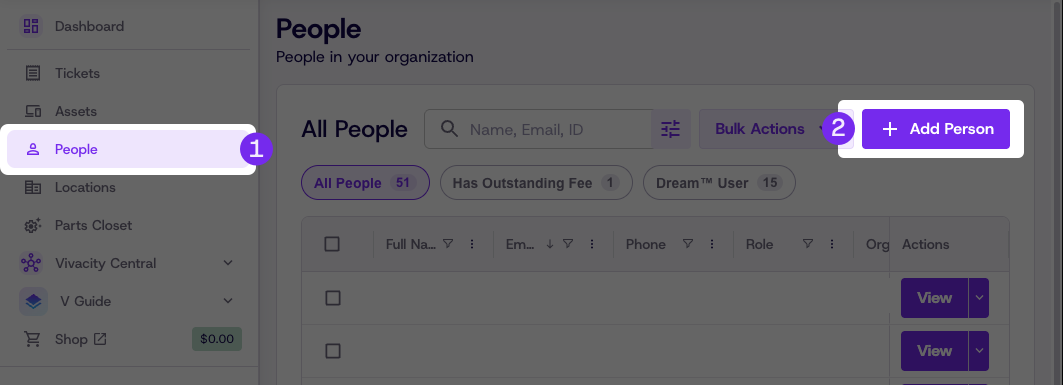
Click People
-
Click the Add Person button
-
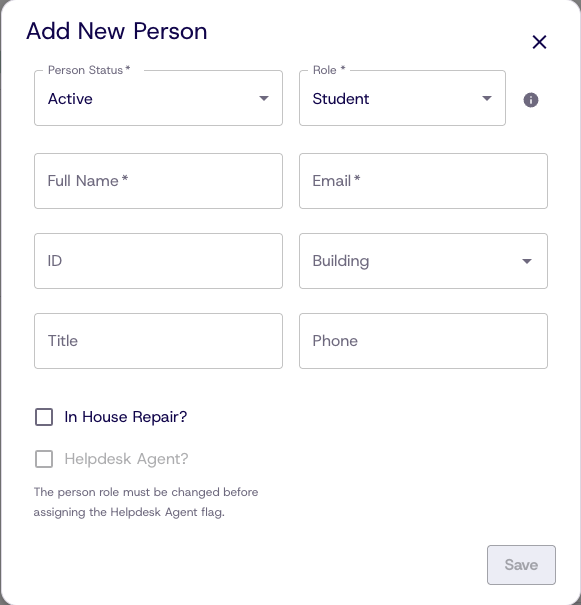
Enter the required Person details — required fields are marked with an asterisk (*)
-
Click the info icon for brief role descriptions
-
Click the checkbox next to In House Repair for People who can complete internal repairs
-
Click the checkbox next to Helpdesk Agent for People who will respond to or create helpdesk tickets
-
Click Save
Updated 8 days ago