
Dream Referral Program
Refer a fellow district to Dream and earn Vivacity credit toward anything on our platform, hardware, parts, subscriptions, and more.
How it Works
Earn Without a Cap
Refer as many districts as you want. There's no annual limit, every successful referral adds another $1,000 in credit to your account.
Spend It Your Way
Credit applies to anything purchased through Vivacity: devices, parts, repairs, or your Dream subscription.
Simple Qualification
No complex hoops. Once the district you referred syncs their Google Admin Console, your credit is automatically applied.
To be eligible for the referral credit, the referred district must not be a current or former Vivacity customer.
How to Get Started
Steps
-
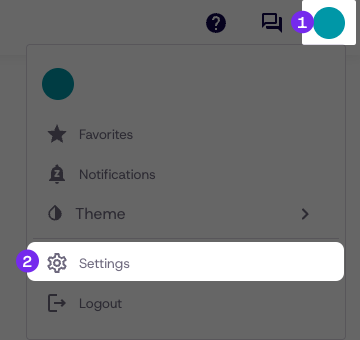
Navigate to the User Menu
-
Click Settings
-
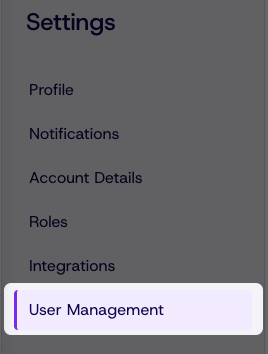
Navigate to the User Management tab from the list
-
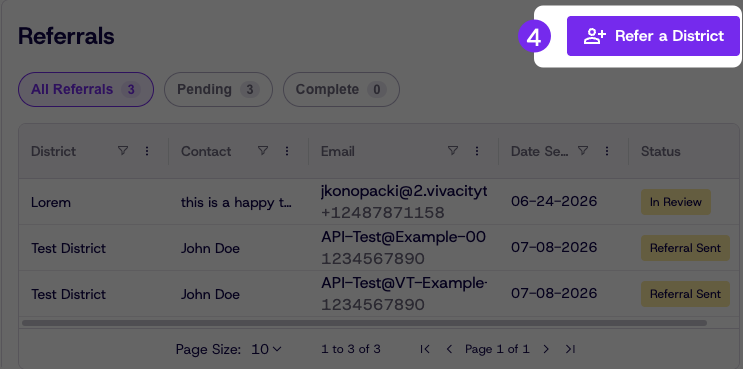
Click Refer a District
-
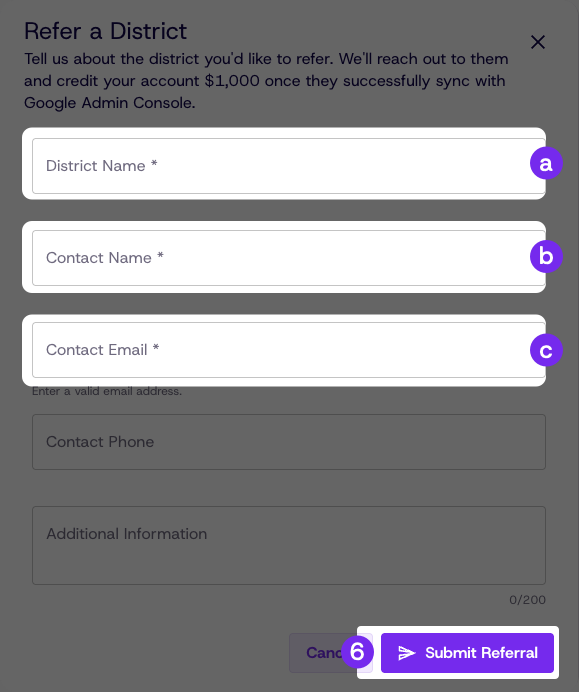
Fill in the required information
- District Name
- Contact Name
- Contact Email
-
Click Submit Referral
Checking the status of a referral
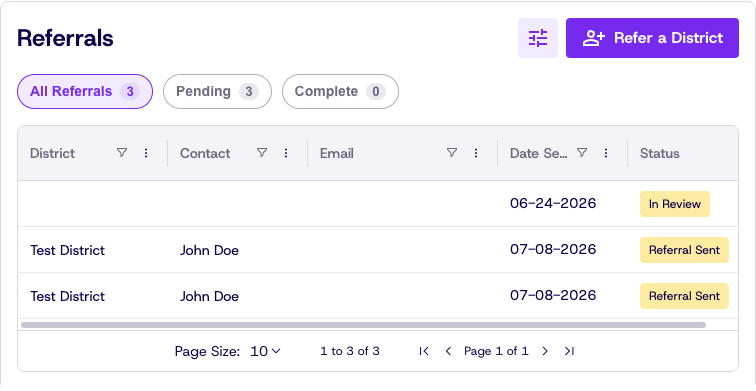
At the bottom of the User Management tab, you can find a table of pending referrals and their current status. New referrals can be made here by clicking Refer a District, and once a referral is confirmed the credit is applied to your account automatically.
Updated 3 months ago