
How to Add a Part During Internal Repair Ticket Creation
When creating a repair ticket, click Create Repair & Add Parts to save time
Steps
-
Select VT Verified Parts (Vivacity's compatibility matrix) or Custom Parts
-
Add the required Part
-
Select Out-of-Warranty or In-Warranty Repair based on the failure type and coverage
-
Check Request Part if you need Vivacity to supply the part
-
Click Create Line Item
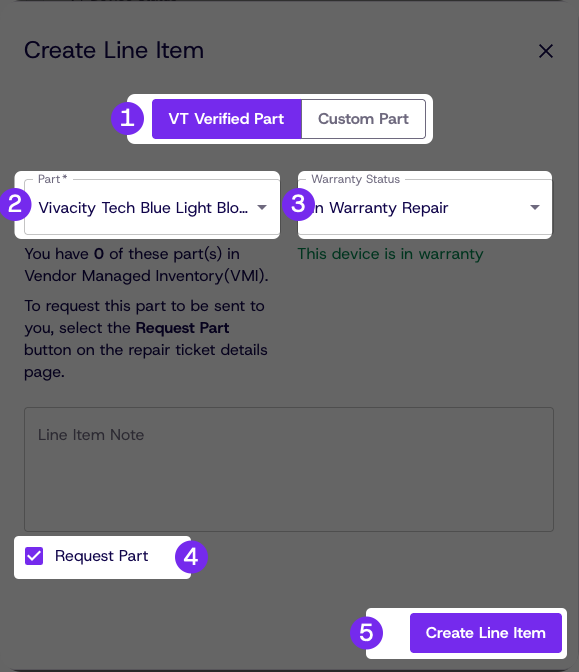
Vivacity will not be notified of the part request unless the part is explicitly requested.
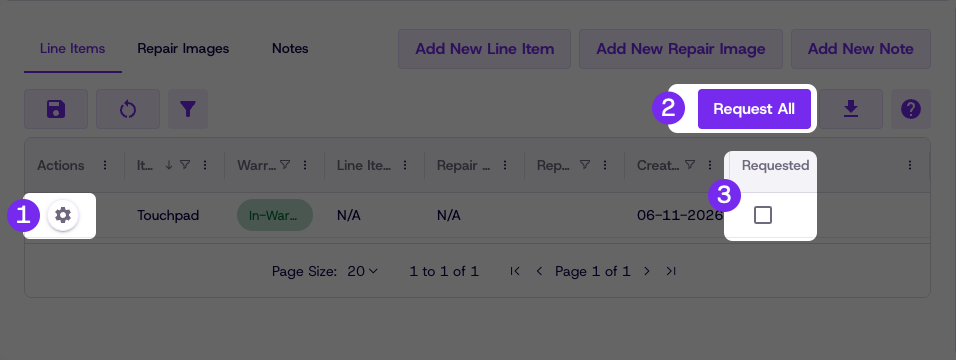
If a line item needs to be requested after its creation, it can be requested by:
Clicking the Actions button, then clicking Request for individual items
Clicking the Request All button to request all line items
The Requested checkbox will show if an item has been requested yet.
For warranty terms and conditions, refer to the Warranty Information tab in the Legal section of Dream™ or contact your account manager.
Updated about 1 month ago